Joe Archondis
June 30, 2026 · 9 min read
AI Agents & RAG
Building an AI Agent with FastAPI and Python
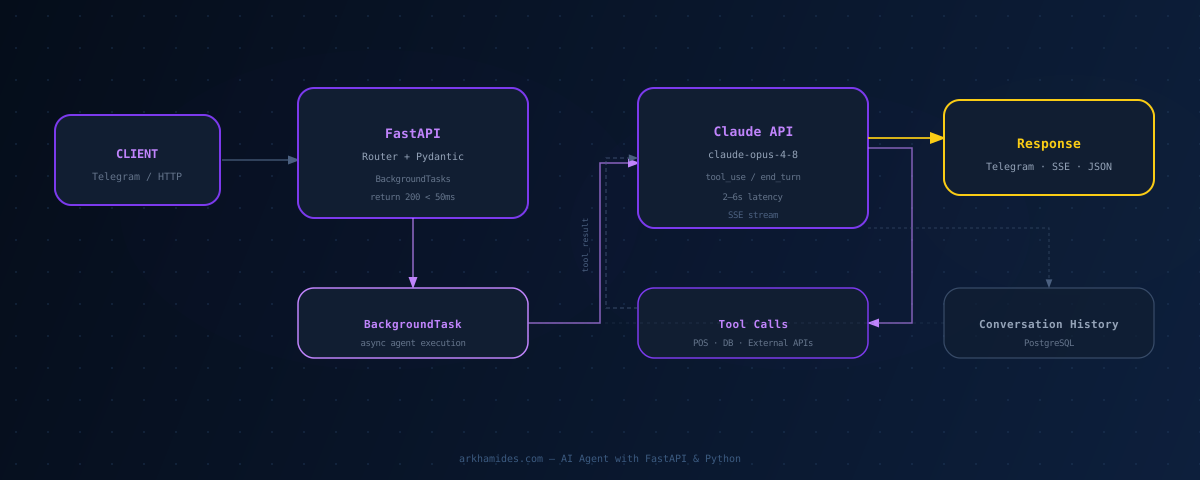
The ShawaMama review bot returns a Telegram webhook response in under 200ms. The Claude API call takes 3–6 seconds. Both are true at the same time. The webhook handler does one thing: queue a background task, then return {"ok": true}. The agent runs after the HTTP response is gone.
I've shipped this same structure on every production AI agent I've built: the ShawaMama ops bot, a B2B lead gen agent, a Telegram-based business intelligence system for a restaurant chain. FastAPI is the foundation every time. The async model, Pydantic validation, and background task handling fit agent architecture better than any other Python framework.
Here's the full structure: project layout, app setup, webhook handling, streaming Claude responses, tool use in the agent loop, and Cloud Run deployment.
Why FastAPI and Not Flask
Flask is synchronous by default. Async was bolted on later, and the seams show. For AI agents, you're constantly calling external APIs — Claude, a database, a third-party service — and waiting. The framework needs to handle that natively, not via workarounds.
The most concrete difference: Telegram webhooks must respond within 5 seconds. Claude API calls take 2–10 seconds. That math doesn't work unless you decouple the HTTP response from the agent execution. With FastAPI's BackgroundTasks, that's three lines of code. With Flask, you're configuring Celery or reaching for thread pools.
Pydantic is the other reason. Every request body, tool input, and structured output from Claude gets validated automatically. When Claude returns malformed JSON, Pydantic catches it at the model layer — not deep in your business logic where the error would be cryptic. You see exactly what failed and why.
FastAPI also generates OpenAPI documentation automatically. When you're building systems where multiple agents call each other's APIs, that documentation keeps the interfaces from drifting. It's not a nice-to-have when things break at 2am.
Project Structure That Scales
For a production agent, I use this layout:
agent/
├── main.py           # FastAPI app, router registration, lifespan
├── routes/
│   ├── webhook.py    # Telegram or external webhook handler
│   └── agent.py      # Direct API endpoints (health, query, stream)
├── services/
│   ├── claude.py     # Anthropic SDK wrapper, agent loop logic
│   ├── tools.py      # Tool definitions and execution functions
│   └── memory.py     # Conversation history via PostgreSQL
├── models.py         # Pydantic request/response models
└── config.py         # Settings and API keys from environment
Routes accept requests and call services. Services contain the agent logic. This separation matters when you're debugging a wrong response. It narrows immediately to either the routing layer or the agent logic — you're not searching the whole codebase.
The services/claude.py file is where the agent loop lives: message history management, tool call handling, retry logic on API errors. Everything else is thin wrappers around it. When Claude behavior changes — new model, different response format — you have one file to update.
Setting Up the FastAPI App
The app setup is minimal. One lifespan context verifies credentials at startup, two routers, nothing else:
from fastapi import FastAPI
from contextlib import asynccontextmanager
from routes import webhook, agent
import anthropic

@asynccontextmanager
async def lifespan(app: FastAPI):
    # Crash at startup if the API key is missing or invalid
    client = anthropic.Anthropic()
    client.models.list()
    yield

app = FastAPI(lifespan=lifespan)
app.include_router(webhook.router, prefix="/webhook")
app.include_router(agent.router, prefix="/agent")
The lifespan context runs before the app accepts traffic. If the Anthropic API key is missing or invalid, the service won't start. Better to fail loudly at boot than discover auth errors mid-request under production load.
Webhook Handling with Background Tasks
This is the core pattern for any messaging bot. Return 200 immediately. Run the agent after.
from fastapi import APIRouter, BackgroundTasks, Request
from services.claude import run_agent

router = APIRouter()

@router.post("/telegram")
async def telegram_webhook(
    request: Request,
    background_tasks: BackgroundTasks
):
    body = await request.json()

    message = body.get("message", {})
    chat_id = message.get("chat", {}).get("id")
    text = message.get("text", "")

    if not chat_id or not text:
        return {"ok": True}

    # HTTP response returns here — agent runs after
    background_tasks.add_task(run_agent, chat_id=chat_id, query=text)
    return {"ok": True}
The webhook returns in under 50ms. Telegram receives its acknowledgment. Then the background task fires: the Claude API call, tool execution if needed, and finally a Telegram API call to send the result. The agent's 3–6 second runtime is invisible to the webhook timing requirement.
This pattern works for any platform with a webhook timeout constraint — WhatsApp Business API, Slack event subscriptions, Stripe webhooks. Return fast, do the work after. FastAPI's BackgroundTasks runs in the same process as the server. No queue infrastructure, no Redis, no Celery worker to configure and monitor.
One important note: BackgroundTasks run until completion even after the HTTP response is sent, but they don't survive a server crash. For critical operations — anything where losing the task would be unacceptable — use a proper task queue like Celery with Redis. For most agent use cases, BackgroundTasks is the right tradeoff.
Streaming Claude Responses
For web interfaces — not Telegram bots — streaming lets users see tokens arrive instead of waiting 4–6 seconds for a complete response. FastAPI handles this with StreamingResponse and the Anthropic SDK's messages.stream():
from fastapi import APIRouter
from fastapi.responses import StreamingResponse
import anthropic

router = APIRouter()
claude = anthropic.Anthropic()

@router.post("/stream")
async def stream_response(query: str):
    def generate():
        with claude.messages.stream(
            model="claude-opus-4-8",
            max_tokens=2048,
            messages=[{"role": "user", "content": query}]
        ) as stream:
            for text in stream.text_stream:
                yield f"data: {text}\n\n"
        yield "data: [DONE]\n\n"

    return StreamingResponse(
        generate(),
        media_type="text/event-stream",
        headers={"Cache-Control": "no-cache"}
    )
The text_stream iterator yields tokens as Claude generates them. The client receives a standard Server-Sent Events stream and renders tokens in real time. First token typically arrives in under a second, even on responses that take 5+ seconds to complete fully.
Tool Use in the Agent Loop
When the agent needs live data — query a POS system, fetch current inventory, look up a customer record — Claude returns a tool_use block instead of a final answer. You execute the tool and send the result back. The loop continues until Claude returns end_turn.
import anthropic
import json

claude = anthropic.Anthropic()

TOOLS = [
    {
        "name": "get_sales_data",
        "description": "Fetch sales for a date range and location",
        "input_schema": {
            "type": "object",
            "properties": {
                "start_date": {"type": "string", "description": "YYYY-MM-DD"},
                "end_date": {"type": "string", "description": "YYYY-MM-DD"},
                "location_id": {"type": "string"}
            },
            "required": ["start_date", "end_date"]
        }
    }
]

async def run_agent(chat_id: int, query: str):
    messages = await load_history(chat_id)
    messages.append({"role": "user", "content": query})

    while True:
        response = claude.messages.create(
            model="claude-opus-4-8",
            max_tokens=2048,
            tools=TOOLS,
            messages=messages
        )

        if response.stop_reason == "end_turn":
            answer = response.content[0].text
            await send_telegram_message(chat_id, answer)
            await save_exchange(chat_id, query, answer)
            return

        if response.stop_reason == "tool_use":
            tool_results = []
            for block in response.content:
                if block.type == "tool_use":
                    result = await execute_tool(block.name, block.input)
                    tool_results.append({
                        "type": "tool_result",
                        "tool_use_id": block.id,
                        "content": json.dumps(result)
                    })

            messages.append({"role": "assistant", "content": response.content})
            messages.append({"role": "user", "content": tool_results})
The loop runs until Claude has everything it needs to answer. Most questions complete in one round: one tool call, one result, one final response. Questions about trends across locations might run two rounds — one call for this week, one for last week. Three rounds would be unusual.
The conversation history (load_history) persists in PostgreSQL. Each user's last 20 messages load at the start of every request. Follow-up questions — "What about last Tuesday?" after "How were sales this week?" — work naturally because the context is there.
One thing I always add: log the full conversation including tool calls and results. When an answer is wrong, you need to know whether Claude called the wrong tool, called the right tool with wrong parameters, or got the right data but reasoned incorrectly. Those are three different problems with three different fixes.
Deploying to Cloud Run
FastAPI runs on Uvicorn. The Dockerfile is minimal:
FROM python:3.12-slim
WORKDIR /app
COPY requirements.txt .
RUN pip install --no-cache-dir -r requirements.txt
COPY . .
CMD ["uvicorn", "main:app", "--host", "0.0.0.0", "--port", "8080", "--workers", "1"]
Cloud Run requires port 8080. Set --workers 1 explicitly. Cloud Run scales horizontally by spinning up new instances. Multiple workers on a single instance compete for the same memory and conflict on shared database connection pools. One worker per instance, let Cloud Run add instances under load.
API keys go into Cloud Run secrets, not the Dockerfile. The ShawaMama bot's Anthropic key, Telegram token, and PostgreSQL connection string are all Cloud Run secrets — the container reads them at runtime via the environment. If a key gets rotated, you update the secret. The image stays unchanged.
Cold start on a minimal Python 3.12 image with FastAPI and the Anthropic SDK is under 3 seconds. With min-instances=1 in Cloud Run, the bot stays warm permanently for around $5/month. Worth it for a production system where a cold start on the morning digest would delay the owner's 8am briefing.
The Full Stack in Practice
The ShawaMama bot runs on this exact stack. FastAPI on Cloud Run, PostgreSQL on Cloud SQL, the Anthropic SDK for Claude calls, and the Telegram Bot API for delivery. The complete setup took about a week to build and has been running without a restart since deployment.
| Component | Choice | Why |
|---|---|---|
| Framework | FastAPI | Async-first, Pydantic validation, BackgroundTasks |
| Server | Uvicorn, 1 worker | Cloud Run handles horizontal scaling |
| LLM | Claude via Anthropic SDK | Tool use, streaming, reliable JSON outputs |
| Database | PostgreSQL | Conversation history, tool result caching |
| Interface | Telegram Bot API | No frontend to build, mobile-native |
| Hosting | Google Cloud Run | Scale to zero, ~$5/month for one warm instance |
The pattern generalizes. Swap Telegram for a REST endpoint and you have a web-facing agent. Swap the POS tool for a CRM API and you have a sales intelligence bot. The FastAPI structure stays the same. The agent loop stays the same. Only the tools and the interface change.
Frequently Asked Questions
What is the difference between FastAPI and Flask for building AI agents?
FastAPI is async-first and built around Pydantic validation. Flask is synchronous by default — async was added later and the fit shows. For AI agents, you need to handle Claude calls that take 2–10 seconds, return webhook responses in under 200ms, and validate structured tool outputs. FastAPI handles all three cleanly. Flask requires Celery or thread pools for the background task pattern and manual validation for tool outputs.
How do I handle long-running Claude API calls without timing out a webhook?
Use FastAPI's BackgroundTasks. The webhook handler returns 200 immediately, then the background task runs the Claude API call after the response is sent. When the agent finishes, it pushes the result to the user via Telegram API or stores it for polling. The pattern works for any platform with a short webhook timeout — Telegram, WhatsApp, Slack.
Should I use streaming or batch Claude responses in FastAPI?
Depends on the interface. For Telegram bots and webhook-based agents, batch is simpler — collect the full response, then send it as one message. For web chat interfaces, streaming with StreamingResponse and SSE gives users visible progress. First token arrives in under a second instead of waiting 4–6 seconds for the full reply.
How do I store conversation history in a FastAPI AI agent?
Store it in PostgreSQL keyed by user ID. Each message — user or assistant — is a row with role, content, and timestamp. At the start of each request, fetch the last 15–20 messages for that user and build the messages array for Claude. Keep enough history for follow-up questions to work naturally, but not so much that token costs inflate on every request.
What concurrency settings should I use on Cloud Run for a FastAPI AI agent?
One Uvicorn worker per Cloud Run instance, with horizontal scaling handled by Cloud Run itself. Multiple workers on one instance compete for memory and conflict on shared database connection pools. For a single-client agent, one always-warm instance handles everything. Set min-instances=1 in Cloud Run to eliminate cold starts — it runs around $5/month.
Related Posts
- How to Deploy an AI Agent to Google Cloud Run — Dockerfile, secrets setup, concurrency config, and the webhook pattern for production
- Tool Use vs. RAG: Choosing the Right Pattern for Your Agent — When to use direct tool calls instead of retrieval, and when to combine both
Working on something similar?
I build AI agents and low-latency systems. If you're trying to solve a version of this, let's talk.
Get in touchAuthor: Joe Archondis — AI systems engineer and HFT infrastructure builder.
Last updated: 2026-06-30