Joe Archondis
June 27, 2026 · 8 min read
AI Agents & RAG
Why Telegram Is the Best Interface for an AI Agent
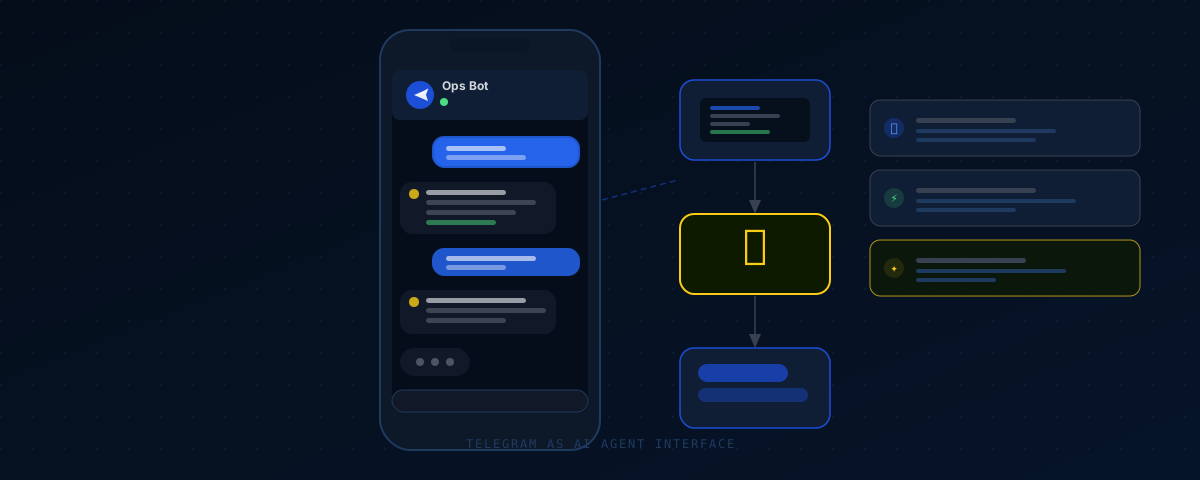
The ShawaMama ops bot sends the restaurant owner a Telegram message every morning at 8 AM: yesterday's revenue across all 6 Paris locations, top items, week-over-week change. No login, no dashboard to open. When a negative review lands, a second message fires with the review text, a Claude-generated draft, and three buttons. He taps Post. It's live on Google within 5 minutes.
I built both agents in Python, both deployed to Cloud Run, both with Telegram as the interface. Not because I couldn't build a web frontend, but because Telegram solved access control, user interaction, and real-time delivery in about 30 lines of code. The web version would have taken weeks longer. Gotten used less, too.
This is what I've learned building Telegram bot AI agents for production clients. Not theory. The actual patterns.
The Interface Problem Nobody Talks About
Most AI agent tutorials stop at the agent logic. Tool definitions, conversation loops, a streaming response — and then "wire this into your app." The hard part is what comes next.
A restaurant owner isn't opening a terminal. A founder running three locations won't bookmark a URL you emailed them. Busy people don't install new apps for every automation tool you build them. Web frontends have real friction: a URL to remember, a login to create, a password that gets forgotten.
WhatsApp Business has API approval gates and rate limits. Slack requires IT involvement in any company past 20 people. Email doesn't support interactive responses. These aren't unsolvable problems. They're just problems Telegram doesn't have.
The ShawaMama owner had Telegram already because half his vendors use it. I sent him a bot link. He tapped Start. The bot began working. That was the entire onboarding.
Chat ID Authentication: No Login Required
Every Telegram account has a chat_id — a stable numeric identifier included in every message your bot receives. It doesn't change. It can't be spoofed by the sender. You don't need to issue credentials or manage sessions.
Access control for a production agent is a whitelist:
ALLOWED_CHAT_IDS = {int(id) for id in os.environ.get("ALLOWED_CHAT_IDS", "").split(",")}

async def process_update(update: dict):
    chat_id = update["message"]["chat"]["id"]
    if chat_id not in ALLOWED_CHAT_IDS:
        await send_message(chat_id, "Access denied.")
        return
    # run the agent
Store the IDs in an environment variable. Authorized users get the bot link — no account creation, no email verification, no password resets. If someone unauthorized finds the bot, they get "Access denied." and nothing else.
The ShawaMama ops bot has three authorized users: the owner and two partners. Adding a fourth is a one-line config change. No user tables, no JWT middleware, no auth service to maintain.
Inline Keyboards Replace Your Frontend
Telegram's inline keyboard is the feature that makes entire categories of web UI unnecessary.
A message can carry buttons. Each button carries a callback_data string. When the user taps one, Telegram fires a callback query to your webhook. Your bot receives it, handles the action, updates the message. No page load. No form submission. No redirect.
The review workflow in three buttons:
def build_review_keyboard(review_id: str) -> dict:
    return {
        "inline_keyboard": [[
            {"text": "✓ Post", "callback_data": f"post:{review_id}"},
            {"text": "✎ Edit", "callback_data": f"edit:{review_id}"},
            {"text": "✗ Reject", "callback_data": f"reject:{review_id}"}
        ]]
    }
The owner taps Post. The bot receives callback_data: "post:abc123", sends the reply to Google, calls editMessageText to replace the keyboard with a confirmation. One tap. Zero frontend. The response is live on Google before most users finish reading the original review.
For confirmation flows, chain keyboards. For free-text edits, use force_reply — Telegram puts the user in reply mode and threads their next message back to the original prompt. The ops bot uses this when the owner wants to customize a message. None of it needed a web frontend.
Proactive Notifications: The Agent Reaches Out
Every other interface waits for the user to show up. Telegram doesn't.
Your bot can send messages at any time without user action. Call sendMessage with the chat_id and content. This changes what an AI agent can be — not just a responder, but something that surfaces information when it matters, unprompted.
The morning digest runs on APScheduler:
from apscheduler.schedulers.asyncio import AsyncIOScheduler

scheduler = AsyncIOScheduler(timezone="Europe/Paris")

@scheduler.scheduled_job("cron", hour=8, minute=0)
async def send_morning_digest():
    data = await fetch_yesterday_sales()
    narrative = await generate_narrative_summary(data)
    await send_telegram_message(OWNER_CHAT_ID, narrative)

scheduler.start()
asyncio.get_event_loop().run_forever()
The pattern generalizes to anything event-driven. A review lands — alert fires. Revenue drops 20% from the same day last week — message goes out. An anomaly in order data — notification. The user doesn't need to remember to check anything. The agent is watching.
Webhooks vs Polling: Use Webhooks in Production
Telegram gives you two ways to receive messages: long polling and webhooks. Use polling locally — it requires no public URL and works while you're developing. For production on Cloud Run, use webhooks.
Webhooks mean Telegram calls you. One HTTP POST per incoming message, delivered the moment it arrives. No polling loop. No persistent open connection. On Cloud Run, your container only runs when there's actual traffic, so idle cost is zero.
Register your webhook with one API call:
https://api.telegram.org/bot{TOKEN}/setWebhook?url=https://your-service.run.app/webhookYour FastAPI endpoint returns 200 immediately and processes the message in the background:
from fastapi import FastAPI, BackgroundTasks

app = FastAPI()

@app.post("/webhook")
async def telegram_webhook(update: dict, background_tasks: BackgroundTasks):
    background_tasks.add_task(process_update, update)
    return {"ok": True}
Don't make Telegram wait for Claude. The model takes 3–12 seconds. Telegram retries if it doesn't receive a 200 quickly, and retries mean duplicate processing. Acknowledge immediately, process async, push the result back via the API when it's ready.
One production detail: store the last handled update_id in Postgres and check for duplicates at the top of process_update. A slow response triggers Telegram to retry. Without idempotency handling, the same message gets processed twice.
Managing Conversation State
Telegram shows the user their conversation history on-screen — they can scroll back through every exchange. Your agent needs to manage state on the backend. For single-user, short-session agents, in-memory works. For multiple users with persistent sessions, store history in Postgres:
async def get_history(chat_id: int, limit: int = 10) -> list:
    rows = await db.fetch(
        "SELECT role, content FROM messages "
        "WHERE chat_id = $1 ORDER BY created_at DESC LIMIT $2",
        chat_id, limit
    )
    return [{"role": r["role"], "content": r["content"]} for r in reversed(rows)]
Pass this to Claude as the messages array on each turn. The model sees full context. Follow-up questions like "and which location was top on that day?" work because the agent remembers what it just told you.
The ShawaMama ops bot keeps 10 turns per user in Postgres. Deploys don't clear history. The owner has asked multi-turn questions mid-investor meeting and the bot tracked context correctly across all of them. No web dashboard would have made that easier.
Ten turns is usually enough. Claude's context window handles far more, but keeping 10 turns per user prevents Postgres from ballooning as conversations grow over weeks. Adjust by use case — a complex ops assistant might need 20, a simple FAQ bot might need 5.
Frequently Asked Questions
Is Telegram secure enough for a production AI agent?
For most business applications, yes. Messages are encrypted in transit with TLS. The chat_id whitelist restricts the bot to authorized users only. For regulated industries with strict data residency requirements, check Telegram's privacy policy before deploying. For restaurant ops, B2B lead gen, and business automation, I've run production client systems on it for months without issue.
Can I build a Telegram bot AI agent that serves multiple users?
Yes. Every incoming message includes the sender's chat_id, so you can maintain separate conversation histories per user in a database like Postgres. Extend the whitelist to a role mapping to support different access levels. The ShawaMama ops bot has owner and partner roles: the owner triggers exports, partners query-only.
What is the Telegram Bot API rate limit?
30 messages per second globally, 20 messages per minute to the same chat. A typical business AI agent with a handful of users sending a few messages a day will never approach these limits. The rate limit that actually bites most projects is the Anthropic API limit on Claude requests. You hit Claude before you hit Telegram.
How do I test a Telegram bot AI agent locally without a public URL?
Use polling mode during local development — call getUpdates in a loop, no public URL needed. When you want to test the webhook path, use ngrok to expose localhost:8080 to a public HTTPS URL, register it with setWebhook, then switch to your Cloud Run URL at deployment time.
Can a Telegram bot send files and images, not just text?
Yes. The Telegram Bot API supports sendDocument, sendPhoto, sendAudio, sendVideo, and more. Files up to 50MB, photos up to 10MB. The morning digest could attach a PDF sales report — plain text with Markdown formatting works better for quick scanning, but the capability is there when you need it.
Working on something similar?
I build AI agents and low-latency systems. If you're trying to solve a version of this, let's talk.
Get in touchAuthor: Joe Archondis — AI systems engineer and HFT infrastructure builder.
Last updated: 2026-06-27