Joe Archondis
July 1, 2026 · 10 min read
Business AI Automation
How We Automated Google Review Management for a 6-Location Restaurant
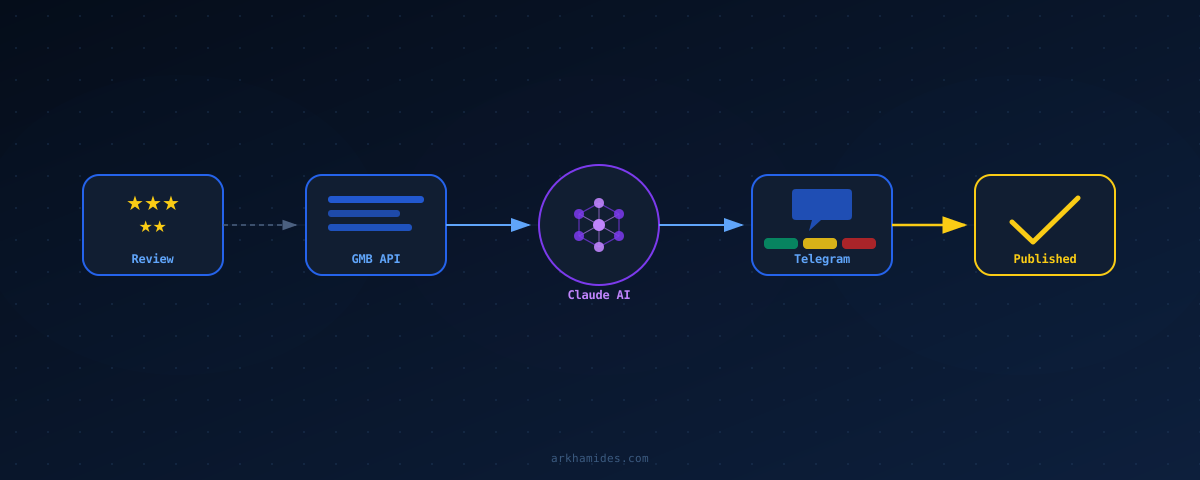
95 negative reviews came in across Shawar'Mama's 6 Paris locations in the first week after I deployed the system. Every one got a response within 5 minutes of posting. Before that, the owner was checking Google manually every few days — which meant a 1-star review could sit unanswered for 72 hours, visible to everyone searching for the restaurant while deciding where to eat.
The owner knew it was costing him customers. He just didn't have time to stay on top of it. Six locations, a full team to manage, investor meetings, supplier calls. A review-watching system that required his attention was one he'd ignore within a week.
Here's how the system works, what it's built on, and the decisions that actually matter when you're building something like this.
The Problem With Manual Review Management
Google reviews aren't a nice-to-have for a restaurant. They're the first thing a potential customer sees when they search. A 1-star review without a response signals: nobody's paying attention here. That signal doesn't just affect the reviewer — it affects every person who reads the listing in the next week.
Responding manually sounds manageable for one location. For six, it's a part-time job. You log in, navigate to each location, read the review, think of a response that doesn't sound defensive, write it, post it. Twenty minutes minimum if you're doing it properly. Multiply that by six locations and a busy service week.
The goal wasn't to remove the owner from the process entirely. A fully automated system — AI drafts posted without any human review — is risky for customer-facing communications. One bad response to a sensitive complaint can escalate publicly. The goal was to shrink his time commitment to under 30 seconds per review while keeping him in the loop.
System Architecture
The system runs on Google Cloud Run as a FastAPI service with three jobs: poll Google My Business every 5 minutes for new reviews across all 6 locations, generate a draft response for any review with 3 stars or fewer, and send the owner a Telegram message with the review and draft plus three inline buttons — Post, Edit, Reject.
The database is PostgreSQL on Cloud SQL. Every review gets stored with its location, star rating, review text, Claude's draft, and the owner's decision. When a review is marked Posted, the system calls the GMB API to publish the response immediately. When marked Edit, the owner types the revised text in Telegram and confirms with a single tap.
The polling loop runs via APScheduler as a background task. Every 5 minutes it checks the GMB API for each location. New reviews get flagged, processed through Claude, and dispatched to Telegram. The owner's response time is now bounded by how fast he opens Telegram — not by when he remembers to log in to Google.
| Component | Choice | Why |
|---|---|---|
| Framework | FastAPI | Async webhook handling, Pydantic validation |
| Polling scheduler | APScheduler | Runs in-process, no extra infrastructure |
| AI model | Claude Haiku (Anthropic) | Fast, cheap, handles multilingual output |
| Review source | Google My Business API | Direct access to reviews and reply endpoint |
| Interface | Telegram Bot API | Mobile-native, one-tap buttons, already in use |
| Database | PostgreSQL (Cloud SQL) | Dedup, review history, response audit trail |
| Hosting | Google Cloud Run | Always warm at ~$5/month, one min-instance |
The Google My Business API Integration
The GMB API's reviews.list endpoint returns reviews for a given location ID: star rating, text, reviewer name, timestamp, and whether a reply already exists. The filter is simple — star rating 3 or lower, no existing reply, created after the last poll timestamp.
def fetch_negative_reviews(location_id: str, since: datetime) -> list[Review]:
    response = gmb_client.accounts().locations().reviews().list(
        parent=f"locations/{location_id}",
    ).execute()

    reviews = response.get("reviews", [])
    return [
        Review.from_gmb(r) for r in reviews
        if int(r.get("starRating", "FIVE").replace("STAR_", "")) <= 3
        and "reviewReply" not in r
        and parse_timestamp(r["createTime"]) > since
    ]
Each processed review ID gets stored in PostgreSQL with a processed_at timestamp. On the next poll cycle, already-processed IDs are skipped. No duplicate Telegram notifications, no duplicate drafts.
One problem I hit early: the GMB API rate limits aggressively when you list reviews across multiple locations in quick succession. The fix was a 5-second stagger between location requests. Six locations, 5-second gap between each, no rate limit errors since. Small delay, but the owner gets the notification in under 5 minutes regardless.
How Claude Generates the Response
The prompt does three things: detect the reviewer's language, match the owner's previous response tone, and address the specific complaint without sounding defensive. Getting tone right matters. A response that sounds like corporate boilerplate is almost worse than no response.
At generation time, the system fetches the owner's 5 most recent responses for that location from PostgreSQL and includes them as examples. Claude sees the review text, the detected language, and how the owner has responded before. The output matches his voice — not a generic template.
async def generate_draft_response(
    review: Review,
    response_history: list[str]
) -> str:
    history_text = "\n\n".join([f"Past response: {r}" for r in response_history[-5:]])

    prompt = f"""You are writing a reply to a negative Google review for a restaurant.

Review language: {review.detected_language}
Review text: {review.text}
Star rating: {review.star_rating}/5

Here are the owner's recent responses to show you their tone and style:
{history_text}

Write a reply in the same language as the review. Match the owner's voice from their past responses. Be empathetic and specific to the complaint. End with an invitation to return. Keep it under 150 words."""

    message = anthropic_client.messages.create(
        model="claude-haiku-4-5-20251001",
        max_tokens=300,
        messages=[{"role": "user", "content": prompt}]
    )
    return message.content[0].text
I'm using Claude Haiku, not Sonnet. Review responses don't need complex reasoning — they need to be coherent, on-tone, and fast. Haiku handles it at a fraction of the cost. At current pricing, generating one response costs roughly $0.0005. For 100 reviews a month, that's $0.05 in model costs.
Language detection runs before the prompt using langdetect on the review text. French reviews get French replies. English reviews get English replies. Mixed-language reviews default to French — that's the primary market for these locations. Claude's multilingual output is strong enough that the owner rarely edits the language itself.
The Telegram Interface
The owner doesn't use an admin dashboard. He uses Telegram, which he already has open for the ops bot. Review notifications arrive in the same conversation, so there's no new app to check.
A negative review notification looks like this:
⭐ New 2-star review — Shawar'Mama République
"Service was slow and the falafel was cold. Staff seemed disinterested."
— Ahmed K., 14 minutes ago
Draft response:
"Merci Ahmed pour votre retour honnête. Nous sommes désolés que votre expérience n'ait pas été à la hauteur. La rapidité du service est notre priorité — ce soir n'a visiblement pas reflété nos standards. Nous vous invitons à revenir pour que nous puissions vous montrer notre meilleur."
[✅ Post] [✏️ Edit] [❌ Reject]
Tapping Post calls the GMB API immediately and marks the review responded in the database. Tapping Edit sends a follow-up message: "Type your revised response:" — then listens for the owner's next message. One reply, then a confirm button. Tapping Reject logs the decision and posts nothing.
The Edit flow took some iteration. The first version opened a new thread, which was confusing when multiple reviews came in at once. The final version tracks which review is being edited by chat_id in a short-lived database state. One message, one confirm tap — regardless of how many reviews are in the queue.
Results After the First Month
First week: 95 negative reviews processed across all 6 locations. Every one got a response. Before the system, the owner was responding to maybe 30% of reviews — whenever he happened to check.
Response time dropped from 72 hours (average, on weeks he remembered to check) to under 5 minutes. The 5-minute polling interval is the main bottleneck. GMB push notifications via Pub/Sub could get this near-real-time, but polling required zero additional infrastructure and has been reliable for three months without a failure.
After one month of data, the owner's decision breakdown looked like this:
- 66% posted unchanged — Claude's draft went live as written
- 22% edited — minor tweaks, usually adding a specific location detail or adjusting phrasing
- 12% rejected — reviews mentioning a specific staff member by name, or incidents he wanted to handle personally
The rejection cases are worth noting. They're not failures of the AI — they're cases where personal knowledge is irreplaceable. A review referencing a specific incident the owner knows about, or mentioning an employee by name, needs his voice directly. The system correctly surfaces these; he just handles them differently.
The owner now treats review management the same way he treats a Telegram message from a manager. Glance, tap a button, done. Under 30 seconds per review, from anywhere.
How to Adapt This for Your Business
The architecture works for any business with multiple locations and a meaningful review volume. The GMB polling loop stays the same. The Claude prompt changes based on your business type and response style.
A few decisions worth thinking through before you build:
Polling vs. webhooks
GMB supports Pub/Sub push notifications for new reviews — true near-real-time alerts with no polling interval. I chose polling because it's simpler to set up and debug. For a restaurant getting 20 reviews a week, 5-minute polling is fine. If you're managing a business getting hundreds of reviews daily, the webhook approach is worth the added setup complexity.
Auto-posting vs. human-in-the-loop
Some businesses want fully automated responses — no human step, AI drafts post immediately. That's faster, and works fine for low-stakes review categories. For a restaurant where a single bad response to an allergic reaction complaint can become a news story, human-in-the-loop is the right default. The one-tap Telegram interface makes the human step fast enough that it's not a bottleneck.
Tone calibration
The more example responses you seed the system with, the better the drafts. For a new business with no response history, write 10 to 15 sample responses yourself before deploying. Cover different complaint types — slow service, food quality, staff attitude. Feed those as examples in the prompt. Quality improves noticeably after 20 real responses accumulate in the system.
Cost
At Claude Haiku pricing, generating one review response costs roughly $0.0005. For 400 reviews a month across 6 locations, that's $0.20 in model costs. Cloud Run with one always-warm instance: about $5/month. PostgreSQL on Cloud SQL: $10 to 15/month. The full system runs under $25/month for a 6-location chain.
Frequently Asked Questions
Can you fully automate Google review responses without human approval?
Technically yes, but we don't recommend it for most businesses. AI-generated responses occasionally miss context only a business owner would know — a specific incident, a staff member, a known recurring issue. A human-in-the-loop system with a one-tap interface adds negligible friction while keeping a human accountable for what gets posted publicly on your Google listing.
How does the Google My Business API work for review management?
The GMB API's reviews.list endpoint returns reviews for a given location ID, including star rating, text, reviewer name, timestamp, and whether a reply already exists. You post replies via reviews.updateReply. Rate limits apply — stagger requests across locations if you're polling multiple GMB profiles at once.
What AI model is best for generating Google review responses?
Claude Haiku handles this task well at low cost. Review responses don't require complex reasoning — they need to be coherent, empathetic, and on-brand. Provide the reviewer's language, business context, and 5 to 10 example responses from the owner to calibrate tone. Haiku delivers this at a fraction of Sonnet's cost, roughly $0.0005 per response.
How do you handle multilingual reviews automatically?
Use a language detection library like langdetect in Python before building the AI prompt, then instruct Claude to respond in the detected language. For the Shawar'Mama system, French and English reviews are handled natively. Claude's multilingual output quality means the owner rarely edits for language — only for specific details he wants to add.
How long does it take to build an automated Google review system?
The core system — GMB polling, AI draft generation, Telegram notifications, and response posting — takes about one to two weeks to build and deploy. Most time goes into the Telegram edit flow and the GMB API integration, particularly the location hierarchy and rate limit handling. The Claude prompt takes 2 to 3 hours to calibrate properly with real examples.
Working on something similar?
I build AI agents and low-latency systems. If you're trying to solve a version of this, let's talk.
Get in touchAuthor: Joe Archondis — AI systems engineer and HFT infrastructure builder.
Last updated: 2026-07-01